"We always start by typing in the exact address, then work outward from there" - that comment from a real-estate company managing director and a former homebuilder pro reshaped how we think about address search. Over three days we rebuilt it for all of Kyushu down to the parcel level, catching kana variants and shorthand hyphenated addresses along the way. Here's the story of the team catching fire.
Hello from the MAPRISE development team. This time it's less of a feature announcement and more of a behind-the-scenes story. It started with one comment from two people in the field.
I read maps by area. The field reads them by pin.
I (Kinoko) am a map nerd through and through, and even while building MAPRISE I catch myself reading maps by area without thinking about it. Take in the whole of Kyushu at a glance, zoom into a region that catches my eye, then narrow down from there step by step. Poking around a map is just fun for me, so that's always felt like the natural way to move.
But when I sat down to hear from a managing director at a real-estate company (we'll call her M) and Y-san, who spent years on the front lines at a homebuilder and now works in a different field, I realized the logic runs the opposite way in practice. In their world, the standard move is: type in the exact address you're investigating first, then work outward from there. For collateral appraisal, for preparing a disclosure statement — the starting point is always one specific spot, and only from there do you widen out to hazards, zoning, and transaction records nearby. Not "area to point," but "point to area." The operating assumption I'd taken for granted as a map person turned out to be completely inverted from what's normal on the ground.
Once it was pointed out, it made total sense. Up to that point, MAPRISE's address search really only worked well for landmark buildings, train stations, public facilities, or city/town-level searches. The most basic move in real practice — landing precisely on the exact lot you're after, in one shot — was weak. That comment lit a fire under the development team (which, admittedly, is mostly just me).
Parcel-level coverage across all 249 municipalities in Kyushu
The first thing we tackled was the underlying address data itself. We pulled in town/block and parcel-level data for all 249 municipalities across Kyushu's 7 prefectures from Japan's national Address Base Registry (ABR) — about 28.85 million parcel records. We built this as a hybrid search that blends with our existing geocoder: when a parcel-level match is possible, it resolves to the parcel; when it isn't, it gracefully falls back to the representative point of the town/block, matching the precision naturally to what's actually available.
Kana variants, old/new character forms — handled
Addresses get written differently depending on who's typing. "姪ノ浜" vs. "姪之浜," "竜ヶ原" vs. "竜ケ原." We normalize these variants internally so either spelling lands on the same result. Type the shortened "姪浜" instead of the fuller "姪の浜" and it still resolves correctly. We cross-referenced over 45,000 real entries from the national dataset to mechanically work out which kinds of abbreviation actually occur, and built the matching around that.
Hyphenated shorthand gets corrected into proper block/lot notation, too
Typing out a full Japanese address like "三丁目一番五号" (3-chome, 1-ban, 5-go) is tedious. So we made shorthand like "3-1-5" understandable too.
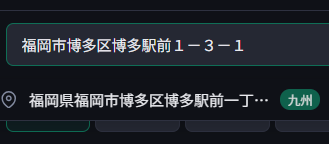
Type in the shorthand version, and the formal notation comes back as a "did you mean" suggestion, as shown above. This isn't just plain string matching — it's paired with some AI-assisted correction, so even a somewhat rough or ambiguous input has a good shot at reaching the right suggestion.
Click the suggestion, and the map flies straight to that exact parcel.
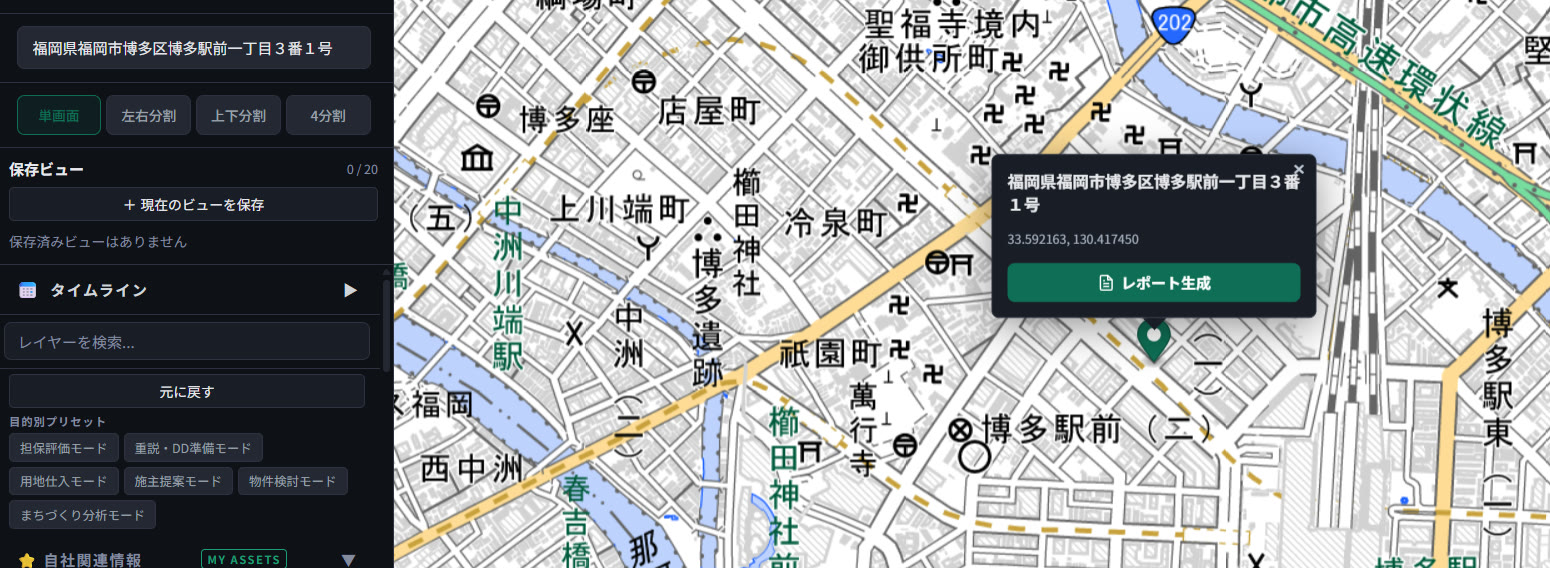
One click, and you land exactly on the target lot — from there you can go straight into generating a report. Land on the exact spot first, then layer on the surrounding context. That's precisely the "point to area" way of working that M and Y-san described to us, now built directly into how MAPRISE behaves.
What real production data revealed that we hadn't caught
To be honest, it didn't go smoothly on the first try. As we built this out, running it against real production data surfaced a handful of bugs we simply hadn't anticipated.
One case: if a user specified a block number that didn't actually exist, the system silently substituted the result for a neighboring block instead of saying so. Another: when an address genuinely couldn't be found, it would confidently name some other plausible-sounding location as "the spot we analyzed." Neither of these showed up in local testing — we only caught them by actually running real chats against the live system. Each time we found one, there was a moment of "oh no, this is a bad one," followed immediately by fixing it on the spot, verifying, and testing again.
We made plenty of mistakes along the way, honestly. But rather than making a big deal out of every slip or making anyone feel bad about it, we work in a mode of "yeah, that happens — let's fix it and try again." Moving forward on the belief that the next attempt will work, instead of freezing up out of fear of another mistake, is what let us build this much, this fast, in just three days.
The joy of watching feedback from the field turn straight into a real feature
What made this one especially satisfying was watching a genuine, on-the-ground comment from people who are (or were) working the front lines of this industry turn into a working feature within days. Hear "here's how I actually want to use this," go build it, and then watch it land exactly on the right spot on screen. Wanting to be useful to someone, wanting people to actually use what you built — watching that turn into something real never stops being fun, no matter how many times it happens.
Thank you, M and Y-san, for the invaluable insight. We'll keep listening to what the field actually needs, and keep building MAPRISE from both a map lover's eye and a practitioner's eye.
The screens shown in this article are live production screenshots. We plan to keep expanding the range of spelling variants and shorthand notations the search can handle.
Tags: #Address search #Geocoding #UI/UX #Data update #Dev story
Other-language share text (exception cases)
Quick share above follows our platform-locked language policy (X-family in Japanese, LinkedIn in English). The four panes below let you grab the opposite-language body when needed — e.g. introducing an English post to a Japanese audience on X, or posting a Japanese article to LinkedIn in Japanese. Each pane offers both a copy button and a direct intent link.
📝 地図オタクは「面」から、不動産のプロは「点」から ― 現場の一言で始まった、住所検索を作り直した3日間
『調査はまず住所をピンポイントで入れて、そこから周辺を見ていく』―― 現役の不動産会社常務(M常務)と、住宅メーカー出身のYさんからいただいた一言がきっかけで、MAPRISEの住所検索を九州全域・地番レベルで作り直しました。ケの字ひとつの表記揺れも、ハイフン区切りの略記も、ちゃんと拾って候補を提案します。開発チームが火のついたように動いた3日間の記録です。
https://maprise.jp/ja/blog/address-search-pinpoint/ #住所検索 #ジオコーディング
🆕 新しいブログ記事を公開しました。

《地図オタクは「面」から、不動産のプロは「点」から ― 現場の一言で始まった、住所検索を作り直した3日間》

『調査はまず住所をピンポイントで入れて、そこから周辺を見ていく』―― 現役の不動産会社常務(M常務)と、住宅メーカー出身のYさんからいただいた一言がきっかけで、MAPRISEの住所検索を九州全域・地番レベルで作り直しました。ケの字ひとつの表記揺れも、ハイフン区切りの略記も、ちゃんと拾って候補を提案します。開発チームが火のついたように動いた3日間の記録です。

👉 詳しくはこちら: https://maprise.jp/ja/blog/address-search-pinpoint/

#UI/UX
📝 Map nerds start from an area. Real-estate pros start from a pin. The one comment from the field that kicked off a 3-day rebuild of address search
"We always start by typing in the exact address, then work outward from there…
https://maprise.jp/en/blog/address-search-pinpoint/ #Addresssearch #Geocoding
🆕 New on the MAPRISE blog.

《Map nerds start from an area. Real-estate pros start from a pin. The one comment from the field that kicked off a 3-day rebuild of address search》

"We always start by typing in the exact address, then work outward from there" - that comment from a real-estate company managing director and a former homebuilder pro reshaped how we think about address search. Over three days we rebuilt it for all of Kyushu down to the parcel level, catching kana variants and shorthand hyphenated addresses along the way. Here's the story of the team catching fire.

👉 Read the full post: https://maprise.jp/en/blog/address-search-pinpoint/

#Addresssearch #Geocoding #UI/UX #Dataupdate #Devstory
Related posts
- We Added Distance and Area Measurement ― Basic GIS Features Deserve Just as Much Care2026-09-13
- Two ways of looking at "fill land" — Embankment Regulation Zones and Large-scale Fill Land, now added2026-07-04
- "What if it rained even harder?" — seeing flood risk in stages, with the Multi-stage Flood Simulation layer2026-07-04